Increase sales in under 24 hours with 0% installments for customers

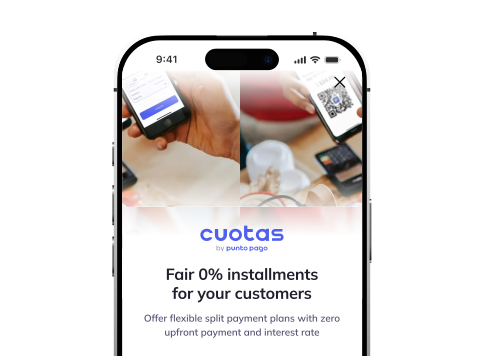
What is Cuotas?
Let your customers buy now and pay later.Get paid in full - no risk with Punto Pago.
Register your company
Create an account, add employees, and get instant access to offer installment payments
Create the order
Enter the purchase amount and show QR code or send the link to the customer to complete the payment
Customer pays in installments
The customer selects a payment plan and pays over time according to chosen terms
You get paid in full
Receive the full amount from Punto Pago while the platform manages financing and risk
Register in 3 min
Download the Punto Pago app and register as a Cuotas merchant
Why Punto Pago?
Sell 30% more
Increase average order sum, attract customers and get profit faster

Attract new customers
Buy now, pay later - for real. With 0% interest, $0 today

No risk
You always get paid - all loans are fully handled by Punto Pago

Marketing support
Get a ready-to-use free set of materials to decorate your store

Start fast
Application approval in up to 24 hours

Over 1 million users
Bring new customers to your store

Get your store on the Punto Pago merchants map
Grow your sales with our app's loyal customers
 Go to app
What do customers get?
Your customers get instant access to flexible installment options, fully managed by Punto Pago. Just create the order and show the QR code.
0%
0%
Interest rateno interest
Payments twice a month4 payments
Down payment$0
Orders up to$175
Interest rateno interest
Payments twice a month8 payments
Down payment$0
Orders up to$175
Interest ratewith interest
Payments twice a month12 payments
Down payment$0
Orders up to$500
Interest ratewith interest
Payments twice a month16 payments
Down payment$0
Orders up to$500
Merchant tariffs
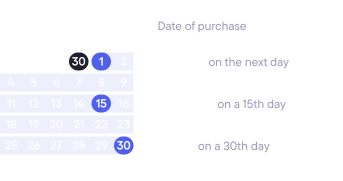
All customer payment options are always enabled. You pay a commission on each sale and choose when to receive the funds.
First 60 days with a discount

Light
Get paid on 30th day
8.5%5%
Comfort
RecommendedGet paid on 15th day
10%8%
Rápido
Get paid on the next day
13.5%11%
*no additional taxes, ITBMS included

FAQ
We’ve answered the most common questions
Registration is done directly inside the Punto Pago app and takes just a few minutes. You'll need to provide basic business details: name, RUC, Aviso de Operación and a company bank account for payments. If you're a sole entrepreneur (Persona Natural) and your personal ID matches the Aviso de Operación, the process is completed 100% online and is usually approved within one business day.
More details here - https://comercios.puntopago.net/registro-and-contrato/registro-en-cuotas
Yes, you can change it directly in the merchant portal, but no more than once every 24 hours. The change only affects your commission rate and how quickly you get paid - it doesn't change any other account conditions.
Yes. Each employee earns 1% cashback in Punto Pago Points for every sale they successfully process, credited automatically every Monday to their personal wallet. They can use those points like regular funds: pay bills, transfer to their card, or pay off their own loans.
Submitting the application takes about 3 minutes, and review usually takes up to 2 hours, with a maximum of one business day. If your legal structure is simple (sole entrepreneur with matching ID and Aviso de Operación), approval is usually automatic. In more complex cases, a Punto Pago manager will contact you to request additional verification.
The money is credited to your Business Wallet inside the Punto Pago, within the timeframe matching your plan (1, 15, or 30 days after the order is completed). From there you can transfer it to your registered bank account at any time with 0% transfer commissions. No additional taxes apply - ITBMS is already included in the commission shown.
You only pay a commission on successful sales - never on canceled or declined orders. The commission depends on the plan you choose: Light (8.5%, paid in 30 days), Comfort (10%, paid in 15 days), or Rápido (13.5%, paid the next day). For the first 60 days after registering, you get discounted rates (5%, 8%, and 11% respectively).
More details here - https://comercios.puntopago.net/comisiones-and-pagos/planes-tarifarios-disponibles
None of that affects the merchant. Punto Pago takes on 100% of the credit risk: it finances the purchase, handles collections, and handles any missed or late payments. You get paid according to your chosen settlement plan, regardless of whether the customer pays on time, late, or not at all.
Yes. You can invite any number of employees from the "Employees" section of the portal - you just need their phone number, and they accept the invitation in the app. This lets them create orders and assist customers without you having to be present yourself.
More details here - https://comercios.puntopago.net/comenzando/pueden-mis-empleados-usarlo
The evaluation is fully automatic and happens in real time, using internal scoring models, the customer's Punto Pago behavior history, and external credit data (APC). You don't take part in this decision or have access to the customer's credit information. If the credit is declined, the customer sees the reason directly in their app.
More details here - https://comercios.puntopago.net/que-debe-hacer-el-cliente/decision-de-aprobacion-de-credito
The customer can choose from 4 plans: 2 months (4 payments, no interest, up to $175), 4 months (8 payments, no interest, up to $175), 6 months (12 payments, with interest, up to $500), and 8 months (16 payments, with interest, up to $500). All options are shown automatically in the app based on the purchase amount. You don't control or configure which options the customer sees - the platform handles all of that.
More details here - https://comercios.puntopago.net/comenzando/opciones-de-pago-para-clientes
You create the order in Punto Pago app in the merchant portal and show the QR code to the customer (or send them a payment link). The customer scans the code, chooses their installment plan, and receives an automatic credit decision in under 60 seconds. Once approved, they confirm the purchase in the app and you get notified to provide the product or service.
Returns are handled directly between you and the customer, just like with any other sale - Punto Pago doesn't get involved in that decision. If you accept the return, the customer can use the refund to pay off their loan immediately or keep paying the installments as normal until they're done.
More details here - https://comercios.puntopago.net/devoluciones-and-disputas/puede-el-cliente-realizar-una-devolucion
They can create orders, generate QR codes, help customers through checkout, and view the history of their own orders. They cannot change the fee plan, withdraw funds from the Business Wallet, edit business information, or invite other employees.
For registered businesses you'll need your RUC, Aviso de Operación, legal business name, and bank account details. If you're a foreigner or represent a company (S.A., S.R.L., etc.), you'll be asked for additional documents proving your authorization to sign on the business's behalf. You'll receive specific instructions by email after submitting your application.

Punto Pago.
Punto Pago.
Punto Pago.
Punto Pago.
Punto Pago.
Punto Pago.
Punto Pago.
Punto Pago.